How to Keep Track of Family Birthdays
Ask whoever already remembers for everyone's dates in one message, save them once in a list that reminds you, and set a reminder a week ahead for a card and the day before for a call. In many families that person is Mom, so start with her birthday.
Free for up to 10 saved dates. No credit card.
Start with the dates that matter most
You don't need the whole family tree on day one. Start with the people you'd feel worst about missing:
- Mom's and Dad's birthdays, and their wedding anniversary.
- Your partner's parents' birthdays.
- Brothers and sisters, and their partners.
- Grandparents.
- Nieces, nephews and godchildren.
Add the rest as you learn them. For friends, whose dates nobody in the family keeps, see how to keep track of friends' birthdays.
Gather the dates in one go
The dates are usually scattered: your phone's contacts, a family group chat, an old address book, Facebook. (If the family talks in a WhatsApp group, see birthday reminders for WhatsApp for keeping the group's dates.) The quickest way to fill the gaps is to ask the person who already remembers. One message does it: "Could you send me everyone's birthdays? I'd like to keep track of them myself." Most parents are glad to. Ask for the anniversaries in the same message. (More words for asking: how to ask someone for their birthday.)
For the birthdays you only see on Facebook, see how to remember birthdays without Facebook. If someone already keeps the family's dates in a spreadsheet, you can use it as it is: see birthday reminders from a spreadsheet.
Choose reminders that leave time to act
Match the reminder to what you'll do:
- Two weeks before: a gift that needs to ship, or a visit that needs planning.
- A week before: a card by post, for grandparents and anyone who keeps cards. See when to mail a birthday card.
- The day before: a call or a message. Write it then, and you can schedule the text to go out on the day.
For your parents, two reminders are worth it: one a week ahead for a card or a plan, one the day before to call.
Free ways to keep the list
- Your phone's calendar: add each birthday as a yearly event with an alert. Free, and already in your pocket. Step by step: on iPhone or on Android.
- A shared family calendar: everyone can add dates, and nobody carries the whole list alone.
- A paper list on the fridge: old-fashioned, and it works if you look at it every week.
The method matters less than having one place, and making sure it actually reminds you.
A birthday reminder with the message ready
If you'd like the reminder to arrive with the words ready, Greetigo is one option. Save each person's birthday, and Greetigo emails you the day before and on the day by default (for each date you can choose on the day, or 1, 3, 7 or 14 days before, in any combination) with a message already written. You review it, then send it, or copy it into a text or a card. It works in any browser and as an app for iPhone (US only) and Mac.
What it doesn't do: each account belongs to one person, so it isn't a shared family calendar. There's no Android app and no text-message reminders; reminders come by email. Free holds up to 10 saved dates; Plus and Premium have no limit, which helps if your family list is long.
When the dates come back in one message, paste it as it is: Greetigo reads lines like "Grandma Dec 25" and "Uncle Joe July 4" and shows you the list to check before anything is saved. You can also add dates by hand, import a contacts (.vcf), CSV or calendar (.ics) file, or pick people from your Contacts in the iPhone app (US only).
What the reminder email looks like
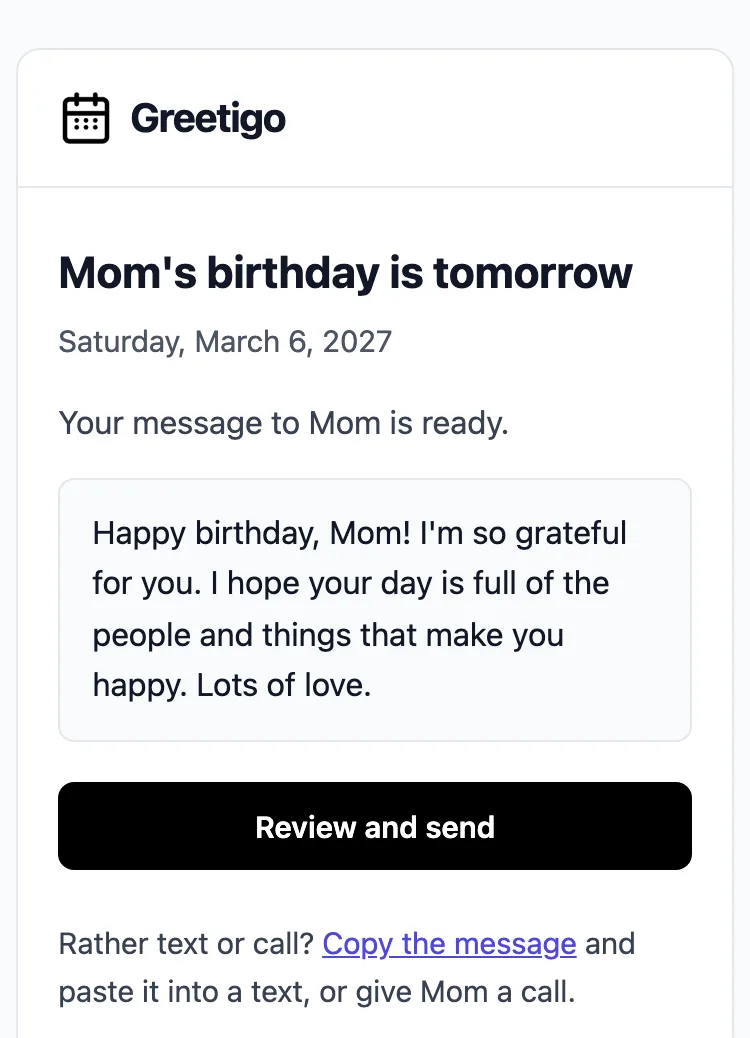
This is the email Greetigo sends you in the morning before a date you save. A new date is reminded the day before and on the day by default, or on the days you choose.
The message is already written: one you saved for that date, or one written for that person with AI if you allow AI drafts (on every plan, Free included), or else one of our templates with their name. Tap Text it, WhatsApp or Email it to send it from your own app, or Copy or change it. Nothing is sent without your click.
Who makes Greetigo: Made by the Greetigo team. For questions or help, email team@greetigo.com, or use the contact form. More on what Greetigo does and costs.
If you've already missed one
Say something today; it matters more than the perfect words. There are guides for Mom or Dad, a sister or brother, Grandma or Grandpa and anyone else. For on-time messages: birthday wishes for Mom and birthday wishes for Dad.