No app to install
Birthday Reminder Emails With the Message Ready
Greetigo emails you the day before each birthday you save (or up to 2 weeks early), with the message already written. It also emails you before holidays like Diwali, Mother's Day and Thanksgiving, with a message ready. Review it, then send it or copy it. It's a website, so there is nothing to install on your phone, and there are apps for iPhone (US only) and Mac if you want them. Free for up to 10 saved dates, no credit card needed.
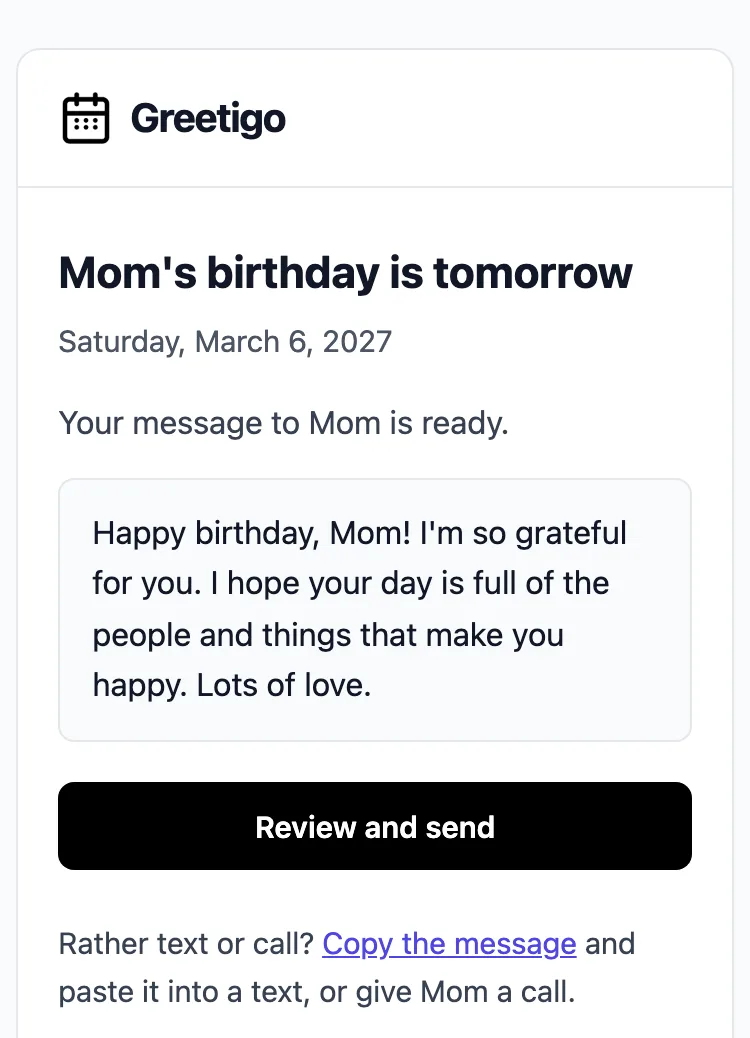
What the email looks like
- What arrives: an email to you, with the person's name and the date in the subject, and a message already written: the AI-written draft you saved for that date (Plus and Premium), otherwise a free template with their name. The reminder email itself never writes a new draft.
- When: in the morning in your time zone, the day before by default. For each date you can choose on the day, or 1, 3, 7 or 14 days before, in any combination.
- What's free: up to 10 saved dates, each with its reminder emails and a free message template, and 2 messages a month sent from Greetigo (copying is unlimited). Plus (US$4.99 a month or US$49.90 a year) and Premium (US$9.99 a month or US$99.90 a year) add AI-written drafts and remove the 10-date limit.
- What you do: click Review and send to see it and email it to them (when you have saved their email), or copy it into a text or your own email. Nothing is sent without your click.
- Who gets it: only you. The person you're remembering hears nothing from Greetigo unless you click Send.
Who makes Greetigo: Made by the Greetigo team. For questions or help, email team@greetigo.com, or use the contact form. More on what Greetigo does and costs.
A reminder for you, not an email to your customers
Greetigo reminds you before the birthday of someone you know, with the message ready for you to send yourself. It is not a marketing tool: it does not send automatic birthday emails to a list of customers or subscribers, and nothing goes to anyone until you click Send.
Keeping track of your team's birthdays? See the employee birthday tracker: the reminders still come to you.
What you get
An email before each birthday, with the words ready. Plus and Premium add AI-written drafts when you want help with the words.
Email reminders
Get an email before each birthday. The default is the day before, or choose the day itself, or 3, 7 or 14 days before, so you have time to prepare. SMS reminders are not offered.
AI-written drafts
Need help with the wording? Plus and Premium add AI-written drafts you can tailor to the person and your tone.
Add dates your way
Add birthdays by hand, paste a list, or import a contacts (.vcf), calendar (.ics) or CSV file. Imports are one-time, so add new dates as they come up.
The message is already written
Each reminder email has a message ready: the AI-written draft you saved for that date (Plus and Premium), otherwise a free template with their name. Change it as much as you like.
Nothing sent without your click
You see exactly what will go out. Click Send and Greetigo emails it to them, or copy it into a text or your own email.
Room for everyone
Track the birthdays that matter: family, friends, coworkers, clients. Free covers 10 saved dates; Plus and Premium remove the limit.
How it works
Create your free account
Sign up with email or Google. No credit card required.
Add birthdays
Import a contacts (.vcf), calendar (.ics) or CSV file, paste a list, or add dates by hand. Birthdays repeat every year.
Choose your reminders
The reminder email comes the day before by default. You can also pick the day itself, or 3, 7 or 14 days before.
Review it, then send it
The reminder email has a message already written. Change it if you like, then send it or copy it. Plus and Premium add AI-written drafts.
A reminder email or a calendar alert?
Both work. Here is the honest difference, so you can pick what suits you.
Doing it yourself in a calendar
- Free, and already on your phone.
- Your phone's calendar can show the birthdays saved in your contacts, and you can add others as yearly events. In Google Calendar, birthdays you add in its app get a reminder a week before and on the day.
- Alerts come as notifications on your phone or in the browser (or by email, if you set that up), which are easy to miss on a busy day.
- It tells you the date; its help pages don't mention help with the words.
A good fit if you have a few dates and act on alerts right away.
An email from Greetigo
- Free for up to 10 saved dates; Plus or Premium for more.
- Arrives in your inbox in the morning and stays there until you deal with it.
- Comes with a message already written, ready to send or copy.
- One list of people and dates. Start by importing a contacts file, a calendar file or a CSV, or by pasting a list.
- Email, plus notifications in the iPhone and Mac apps: no SMS and no Android app.
A good fit if you want the words ready and a reminder that waits for you.
Comparing other birthday reminder services, apps and calendars? See Greetigo next to each one, with facts from their own pages. For phone apps, see the best birthday reminder apps, free and paid.
Birthday reminder FAQ
What does the birthday reminder email say?
Is there a birthday reminder email template I can copy?
When does the reminder email arrive?
Is there a birthday reminder website I can use on my phone?
Is Greetigo really free?
Are there other birthday reminder email services?
Yes. Birthdays Reminder (birthdays.email), Simply Remind Me, Birthday-Reminders.com, KisReminder, Punchbowl Reminders and Postable all send birthday reminder emails. The main difference is what the email holds: most remind you of the date, some suggest or mail a card, and Greetigo's has your message already written. Greetigo is free for up to 10 saved dates.
How is this different from a calendar reminder?
Can I import birthdays from my phone contacts?
Does Greetigo send birthday messages for me?
What makes the AI-written drafts useful?
Can I get a birthday reminder by text message?
Is my data private and secure?
Get your first birthday reminder email
Save a birthday now and Greetigo emails you before it, with a message ready. Free for up to 10 saved dates; Plus and Premium add AI-written drafts.
No credit card · Cancel anytime